 MIDILLI Tech
LumiFind 1.4 Release Notes: Smarter Filters, Safer Indexing, and Better Control
What's New
Bug fixes and improvements.
Developing privacy-oriented software requires transparency. You deserve to know what changed and why. So here is the full picture, whether the update is big or small, without the text we struck through.
Information: For Windows users, this release requires a manual download due to major changes. Auto-update will not work.

Please download it from here: https://lumifind.midilli.tech/download
Summary: LumiFind 1.4.0 improves filtering precision, strengthens analysis safety with backups and checkpoints, expands format and dependency support, refines fine-tune controls, and improves localization and stability.
Search and Analysis Improvements
Better file-type-aware filtering
Search filters display only the file type available for the active search type, making result refinement more accurate and easier to control.
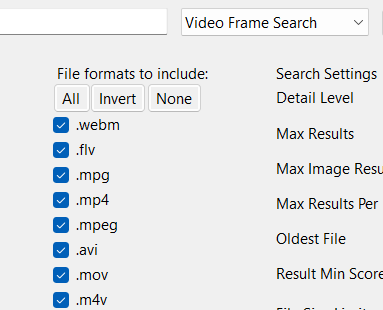
Improved metadata search across all types
Metadata search behaves more consistently across different content categories. It works like your operating system's file search, but significantly faster. It searches file names and paths without semantic interpretation.

Independent video-frame and audio handling
Video frame analysis and audio analysis are now handled independently.
If you previously analyzed your videos and now want to enable frame analysis, you no longer need to reprocess everything from scratch.
Improved timestamps for voice and video audio
Voice and extracted video audio processing now provide more reliable timestamps.
If you find something inside a two-hour video, you will know exactly where it appears.
Analysis Reliability and Safety
Analysis Backups
You can now create full backups of your analysis database, optionally including thumbnails.

Backups show their creation time and allow you to:
- Migrate to another computer
- Reset your system safely
- Protect large archives after long analysis runs
For users analyzing terabytes of data, this is critical.
Checkpoint behavior
Unexpected shutdown after analyzing 5 TB of data is not acceptable.
LumiFind now saves analysis progress periodically using a checkpoint system.
Default interval: every 50 files.
If something interrupts the process, analysis resumes from the last checkpoint instead of starting over.
This can be disabled if you prefer manual control.
Shared analysis for everyone
Previously limited to Team and Enterprise editions, shared analysis is now available to all users.

You can:
- Define a common analysis directory accessible by multiple users
- Ensure only one person analyzes at a time
- Mark shared folders as read-only so others can search but not modify analysis data
This makes family or multi-license setups significantly more powerful.
A detailed guide will follow.
Settings and UX Updates
Fine-tune controls expanded and refined
Fine-tune settings were already available inside the Settings window.
However, we realized new users often did not know they existed.

Now, selected fine-tune controls are visible earlier in the Welcome Window, so users are aware of the control they have from the beginning.
We forgot to surface them sooner. That is fixed.
Search settings reorganized
Search-related settings are moved directly into the Search Mode filter area.
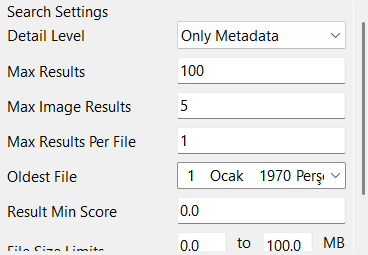
Keeping them buried inside the Settings window was not ideal.
This change improves discoverability and reduces friction.
Some platforms make basic settings harder to reach than they need to be. We prefer clarity.
Automatically check for updates
Updates are perfect ways to benefit from newest features, get bug fixes and feel well treated.

You can be the first one to be notified for new releases. Note that this will not start download, but only will display a message in the logs. This setting is enabled by default, which can be disabled through Settings Window. We never automatically download unless you confirm it.
Configurable internal folders
All LumiFind storage paths can now be changed via Settings, by enabling Advanced Settings.
Changes take effect after restarting. Documentation will be telling you how.
Other Improvements
Open File Exploreris replaced withReveal in File Explorerto directly highlight the file directly, instead of scrolling down and finding it.- Now if you provide a Hugging Face token, you can also download private models. No model is perfect, and you have freedom to find your own if the existing ones are not the best for you. Check documentation to see how.
- Updated dependencies to their latest available versions
- Removed/omitted some heavy components to improve the analysis duration and replaced with simplified solutions.
- Welcome Window and License Manager can be separately started using
--welcome-windowor--license-managerarguments adding to command line. More on documentation.
Fixes
- Corrected localization strings
- Fixed stopping behavior when analysis just started
- Minor layout fixes
Author
MIDILLI