 MIDILLI Tech
LumiFind 1.7 Release Notes: Find Duplicates, a friendlier first run, and a tidier library
Please download it from here: https://lumifind.midilli.tech/download
What's New
We're rolling out LumiFind 1.7, a release about keeping your library tidy — and about feeling at home the moment you launch it. It introduces a dedicated Find Duplicates mode, a re-organized Welcome Wizard that walks you through everything step by step, and a smarter folder watcher that keeps your analysis up to date without redundant work.
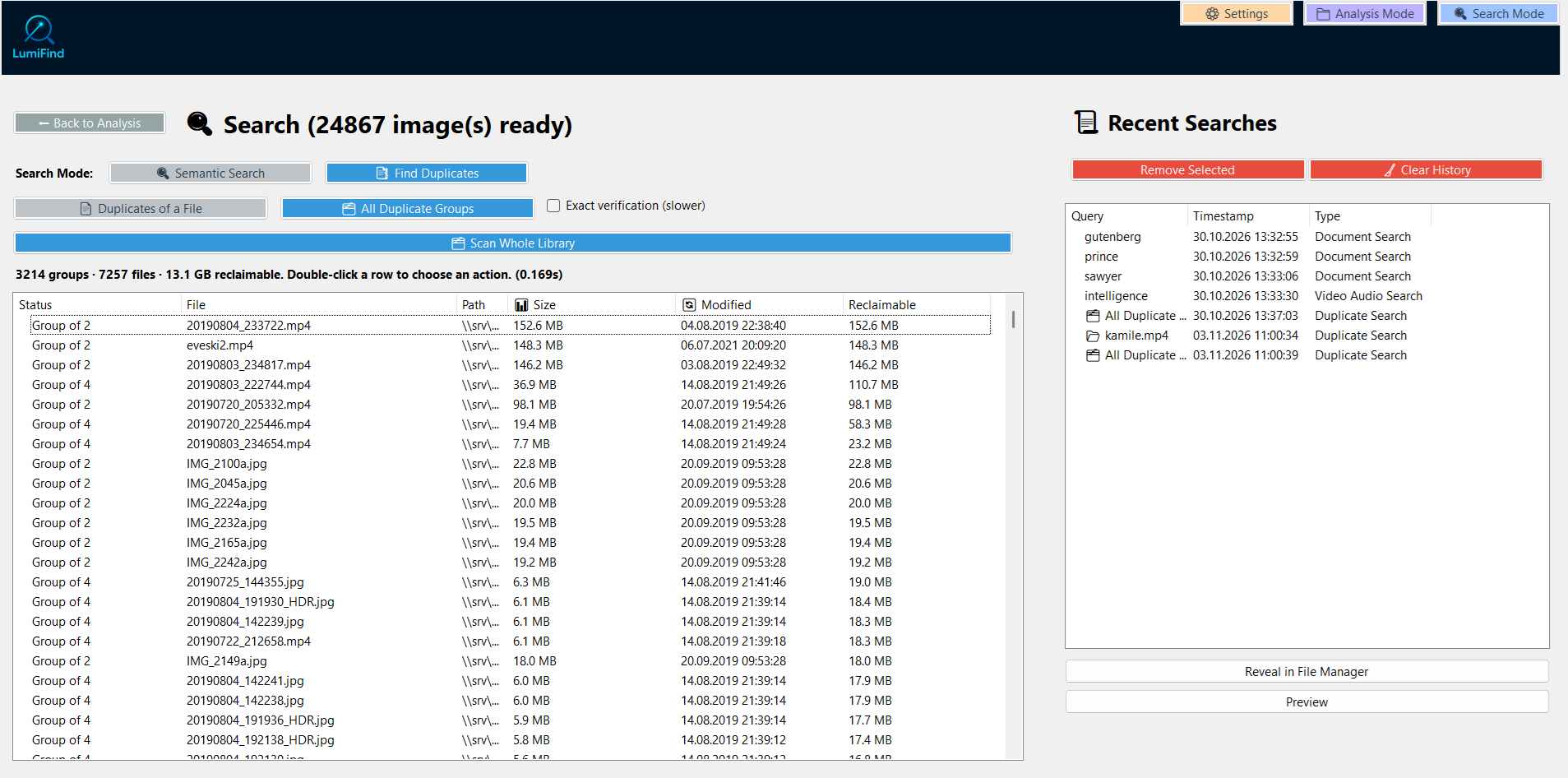
Find Duplicates, finally
How long does it take to photocopy your photo library? LumiFind now answers precisely. Select any file and find its exact copies, or scan your entire library for duplicate groups and see how much disk space each group eats up. Finally, you can clean your Downloads folder without guessing.
Open your file, see its twins
Ever wondered whether that "final_final_v2" document is the same as the one you sent last week? In 1.7 you can quickly check, without waiting for the heavy analysis features to finish.
A Welcome Wizard that actually welcomes
First launch is now four short steps: your language and model, which file types are analyzed, where LumiFind looks, and an optional fine-tune. And it doesn't end after day one — choose Help → Welcome Wizard any time to set your preferences again. As a nice touch, a voice/video language option helps transcription nail foreign speech instead of guessing "auto-detect" every time.
A watcher that keeps up
LumiFind keeps an eye on your folders. In 1.7 it does so more efficiently: when files change, it processes only what actually changed instead of starting over, and it removes leftover data for deleted files automatically. Your library stays current, quietly, in the background.
Know what's happening at a glance
The status bar now tells the truth in real time: what's running, how far along it is, and what it's currently reading. Time estimates are clearer for long analyses, so you can plan your coffee break with confidence.
The little things
Settings options are now simple on/off switches.
LumiFind warns before analyzing folders it cannot reach.
An optional AI model download folder is settable (when Advanced Settings is enabled), so your privacy-conscious downloads can live in a custom location.
"Find Duplicates" is available right after first launch, even before the heavy parts of the setup are done.
Updated libraries with the latest fixes, including an eMudhra security fix.
The status bar no longer reports a finished analysis while indexing is still running, and the semantic view is restored when replaying search history.
License checks no longer rewrite the license file on every startup.
File watcher re-analyzes only changed files and removes deleted-file index data directly across analyzers; batches that combine deletions with existing files use a full scan to preserve move detection.
Fixed crashes and selection problems in the duplicate views.
More small improvements: clearer elapsed/remaining time information (also for video frame analysis), a warning before analyzing inaccessible folders, and a selectable download folder for AI models (in Danger Zone → Set Folders, visible with Show Advanced Settings).
New "Audio/Video Language" option in Model Settings.
Thank you to everyone who reported issues, shared logs, and tested our preview builds. Your feedback helped make this release possible.